

Introduction
Welcome to the Meander Pulse API & SDK documentation. Here you will find all of the information necessary begin adding targeted touch-point surveys to your travel product.
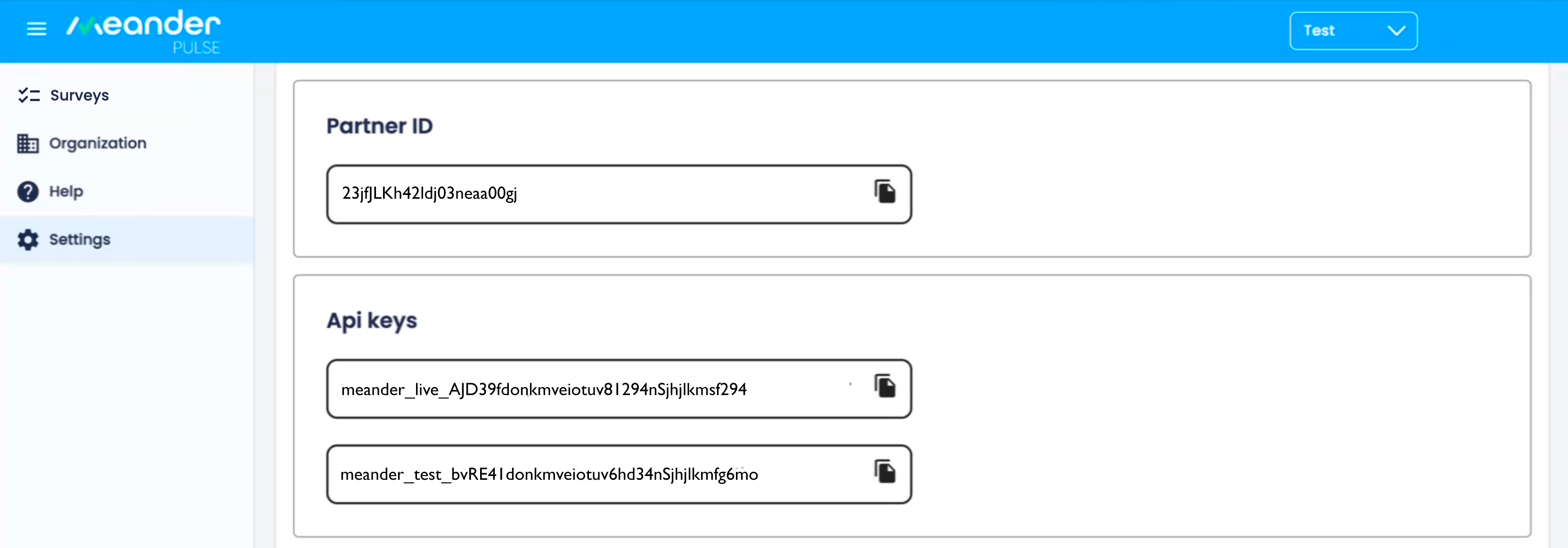
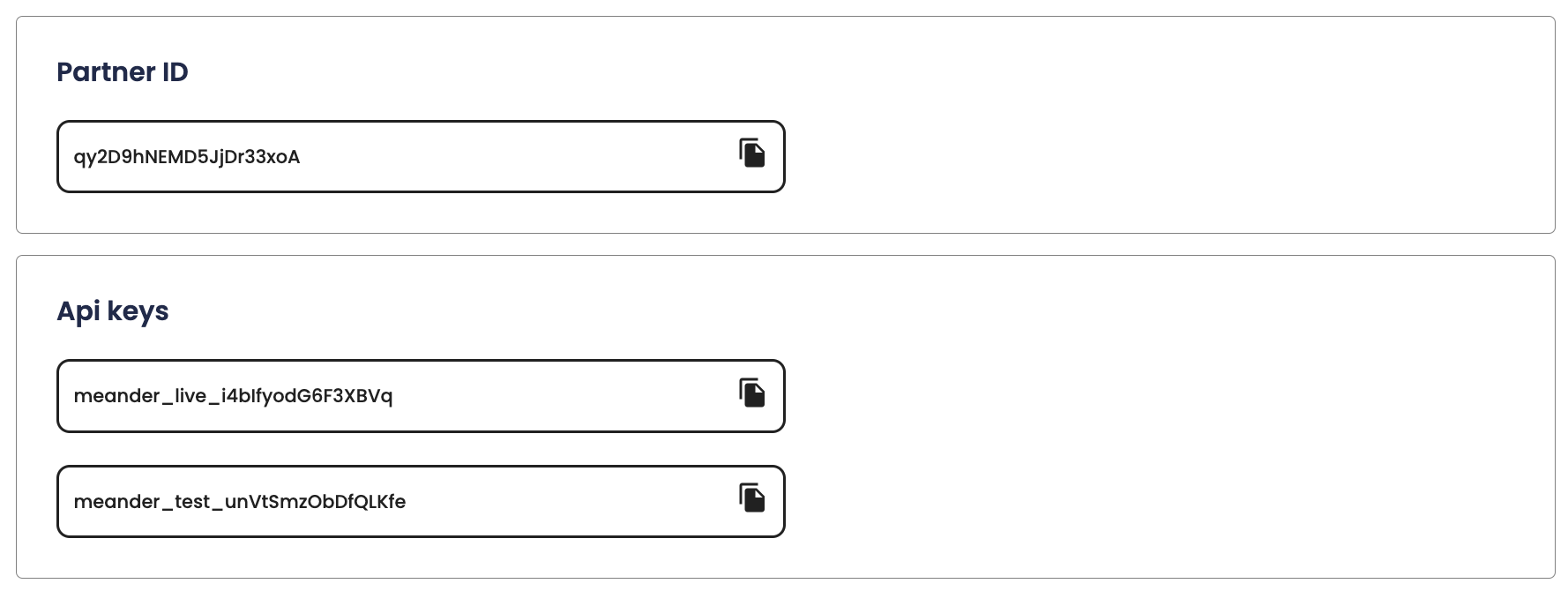
Before you can start using our APIs, you'll need a Partner ID and API key. Complete the Meander contact form to connect with an account manager to get onboarded. Once you’ve activated your key, you’re ready to roll.
Base URL
https://api.meander.travel/v1/partner/
Response Format
All API responses are only returned in JSON.
Authentication
To authorize your request, pass your api key in the header:
curl "https://api.meander.travel/v1/partner/<endpoint>" \
  -X <POST / GET / UPDATE / DELETE>
  -H "key: <api key>"
Make sure to replace
<api key>with your API key..
Pulse uses API keys to allow access to the API. Complete the Meander contact form to connect with an account manager to get onboarded.
Pulse expects for the API key to be included in all API requests to the server in a header that looks like the following:
key: <api key>
Surveys API
Add new survey
curl "http://api.meander.travel/v1/partner/survey" \
  -X POST
  -H "key: <api key>"
-d
{
  "unique": "false",
  "title": "Did you enjoy the in-flight entertainment?",
  "type": "research",
  "options": [
    "yes",
    "no"
  ],
  "target": {
    "airline": "AA",
    "gender": "female"
  }
}
Response:
{
  "id": "djjmk39f9j3nkd93",
  "status": "success"
}
This endpoint adds a survey. A survey represents a single question that will be presented to user. Surveys include several attribute including answer and targeting options.
HTTP Request
POST http://api.meander.travel/v1/partner/survey
Survey Attributes
*Required
| Attribute | Description |
|---|---|
unique* Boolean |
Unique surveys can only be answered once by a user |
title* String |
Question for the user |
type* String |
Type of question: research, competition or demographic |
options* [String] |
Answer options, must have atleast 2 |
target Target |
Required attributes for user to see this survey question |
Target Attributes
| Attribute | Description |
|---|---|
airline Boolean |
Airline of the flight i.e. AA, WV |
gender String |
Gender of the user: male/female |
age_min Int |
Minimum age of user |
age_max Int |
Maximum age of user |
nationality String |
Nationality of user i.e. US, CA |
career String |
Career of user i.e. education, military |
device String |
OS of device i.e. android, ios |
education String |
Highest completed education of user i.e. high school, college degree |
ethnicity String |
Ethnicity of user i.e. black, asian |
height Int |
Height of user in inches i.e. 72 |
income_min Int |
Minimum annual income in USD i.e. 65000 |
income_max Int |
Maximum annual income in USD i.e. 225000 |
marital_status String |
Marital status of user i.e. married, divorced |
political String |
Politcal affiliation of user i.e. democract, green party |
flight_class String |
Flight class of flight i.e. first_class, economy |
home_airport String |
Airport code of user's home airport i.e. IAH, LAX |
departure String |
Airport code of user's departure airport i.e. IAH, LAX |
arrival String |
Airport code of user's arrival airport i.e. IAH, LAX |
Get all surveys
curl "http://api.meander.travel/v1/partner/surveys" \
  -X GET
  -H "key: <api key>"
The above command returns JSON structured like this:
{
  "surveys": [
    {
        "id": "0CUYdEmslHU2oK2fbZac",
        "environment": "test",
        "approved": false,
        "trip_type": 2,
        "delivery": 1,
        "question": "how was your trip?",
        "reward_points": 122222,
        "status": 1,
        "category": 4,
        "created_date": "2024-04-25T09:30:39.383Z",
        "response_count": 7,
        "last_updated": "2024-05-05T11:37:26.335Z"
    }
  ]
}
This endpoint returns a list of all of your surveys.
HTTP Request
GET http://api.meander.travel/v1/partner/surveys
Response Attributes
| Attribute | Description |
|---|---|
approved Boolean |
All surveys must be approved by our validation framework |
status String |
Current status of a survey i.e. active, inactive |
unique Boolean |
Unique surveys can only be answered once by a user |
title String |
Question for the user |
type String |
Type of question: research, competition or demographic |
options [String] |
Answer options, must have atleast 2 |
target Target |
Required attributes for user to see this survey question |
responses Response |
Responses collected for this survey |
author String |
User ID of author of survey |
id String |
ID of survey |
created String |
Date the survey was created |
last_updated String |
Last time and date survey was updated |
Response Attributes
| Attribute | Description |
|---|---|
date String |
Date response was submitted |
response String |
Answer to survey question |
Get survey by ID
// coming soon..
This endpoint retrieves a specific survey.
HTTP Request
GET http://api.meander.travel/v1/partner/survey/:ID
URL Parameters
| Parameter | Description |
|---|---|
| ID | The ID of the survey to retrieve |
Update survey
// coming soon..
This endpoint updates a particular survey.
HTTP Request
PATCH http://api.meander.travel/v1/partner/survey/:ID
URL Parameters
| Parameter | Description |
|---|---|
| ID | The ID of the survey |
Pulse Android SDK
Prerequisites
In order to implement the Meander Pulse Android SDK in your app, you must first complete the following:
- Meander Pulse Account w/ API Key + Partner ID
- Minimum Android version supported
23+ - Compile SDK version
30+
1. Register your app’s package name
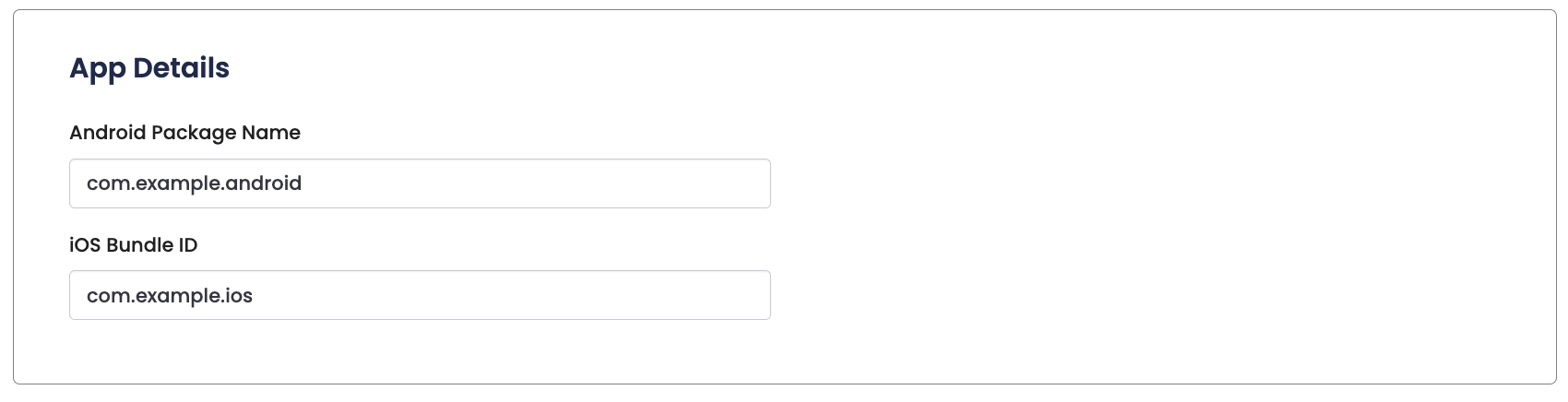
In order for Meander Pulse SDK to authenticate with our server, you'll need to add your app's Android package name in the Meander dashboard:
2. Add repository
The Meander Pulse SDK is hosted on Jitpack for ease of use. Be sure to add the Jitpack repository to your root build.gradle. Depending our project setup, this like can also be added to settings.gradle.kts: maven(url = "https://jitpack.io")
3. Add dependency
Then, add the latest version of the Meander Pulse SDK in the build.gradle/build.gradle.kts file for the project in which you would like to use the Meander Pulse SDK:
Groovy
Kotlin
4. View permissions
The following permissions are automatically added to your manifest file when you import the Meander Pulse SDK library:
5. Perform Gradle sync
Performing a Gradle sync after adding a new dependency in your Android project is crucial to ensure that the new library is properly integrated into the project's build environment. The sync process downloads the new dependency, updates the project's configuration and build path, and allows Android Studio to recognize and index the new library for code completion and other IDE functionalities. This step is essential for the new dependency to be effectively utilized in your code.
6. Initialize the SDK
Java
Kotlin
Methods
// Logout current user clearing the pending surveys // and email address MeanderPulseSdk.logout()
Once the SDK is configured, you just need to request location permissions from your user and the SDK will begin working when ACCESS_FINE_LOCATION has been granted.
Pulse iOS SDK
Prerequisites
In order to implement the Meander Pulse iOS SDK in your app, you must first complete the following:
- Meander Pulse Account w/ API Key + Partner ID
- Swift deployment iOS
15+ - Xcode:
15+
1. Register your app’s bundle ID
In order for Meander Pulse SDK to authenticate with our server, you'll need to add your app's bundle ID in the Meander dashboard:
2. Install the iOS SDK
3. Run pod install
4. Configure permissions
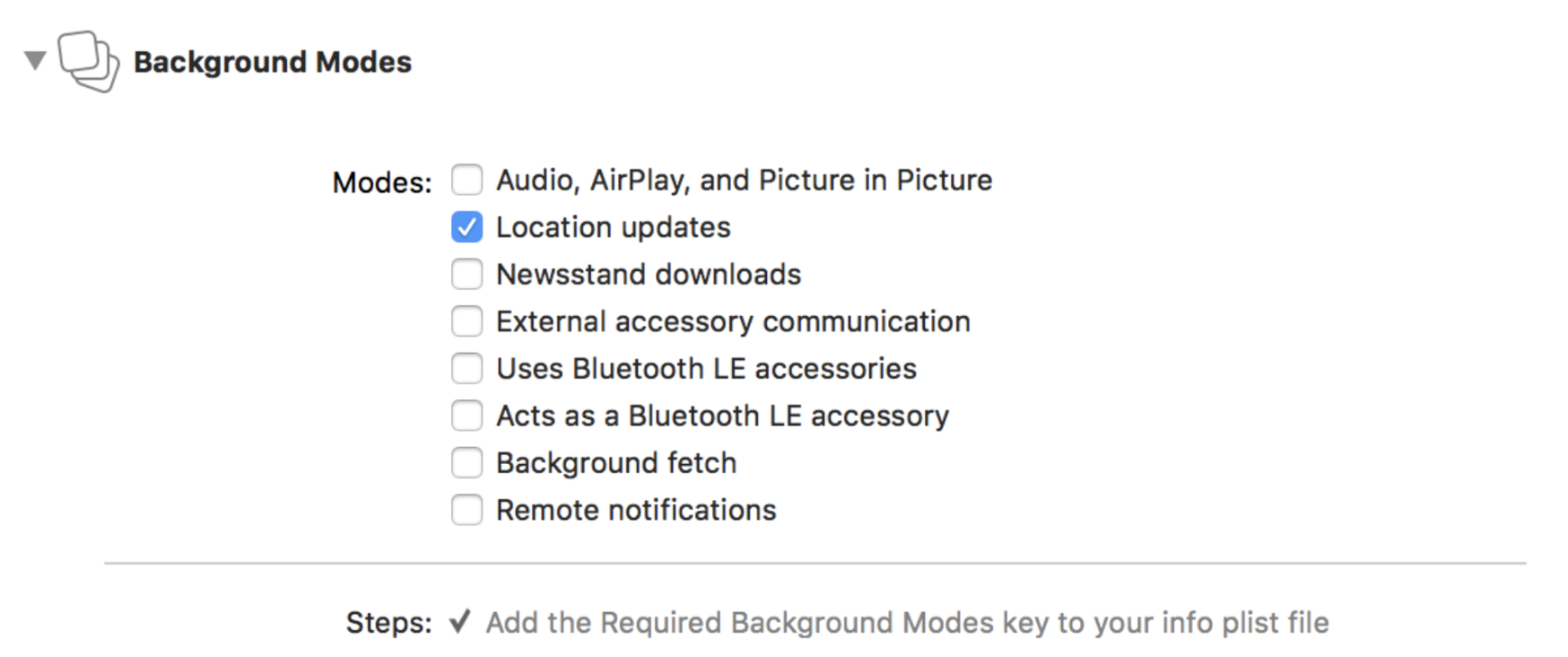
A. Turn Background Modes to On in your project's Capabilities tab and enable the Location updates checkbox:
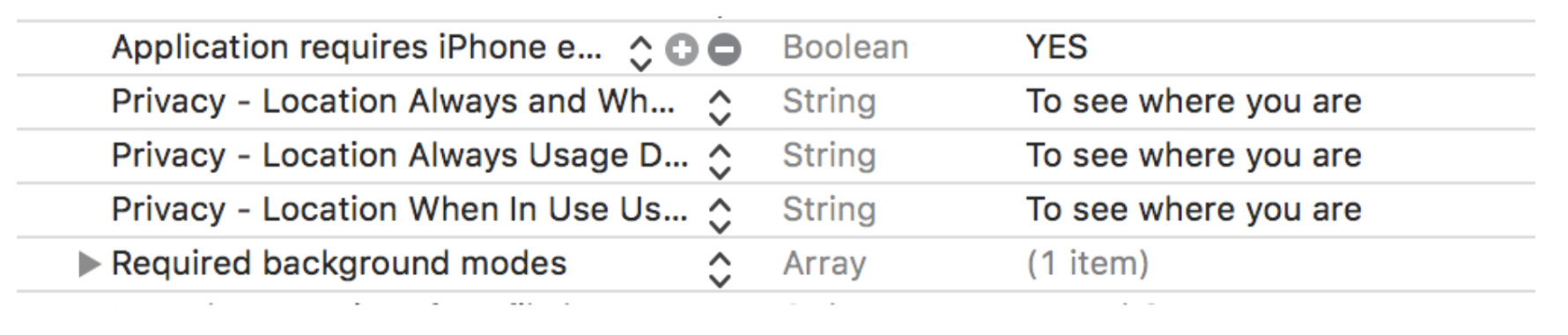
B. Add the following to your iOS permission strings in your project's Info.plist file:
Privacy - Location Always Usage Description
Privacy - Location Always and When In Use Usage Description
Privacy - Location When In Use Usage Description
5. Configure your AppDelegate
Configure the Meander SDK by pasting the following code in the didFinishLaunchingWithOptions method of your AppDelegate.
Swift
Methods
// Logout current user clearing the pending surveys // and email address MeanderPulseSdk.logout()
Once the SDK is configured and set up to handle location events, you need to request location permissions from your user and the SDK will start working when .authorizedAlways.
Pulse Dashboard
Survey
Create a survey in the dasbhoard by entering a question and any number of answer options.
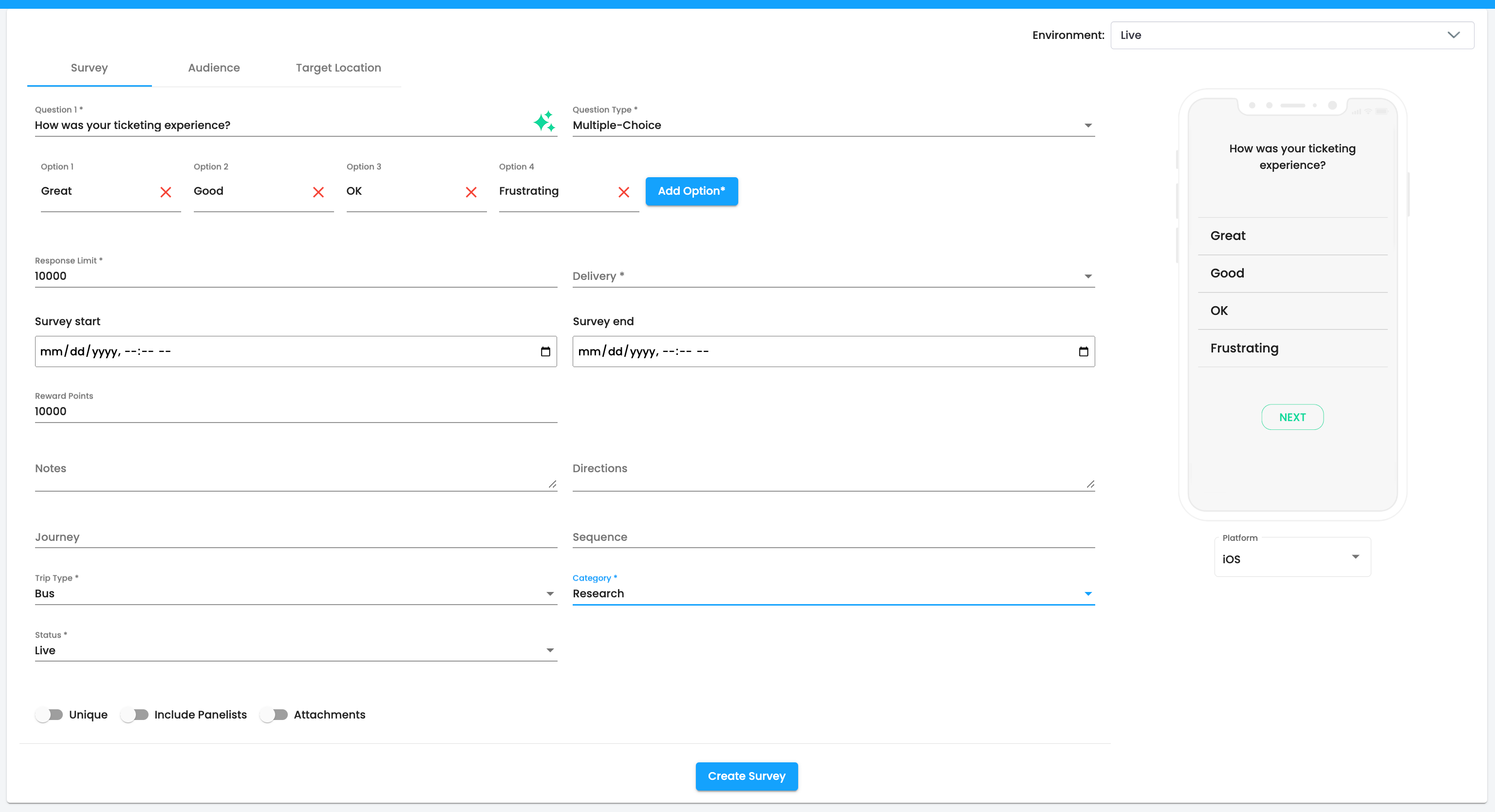
Question Types - Types of questions that can be presented users. Can be Multiple-Choice, Star Rating, or Open-Ended.
Response Limit - The maximum number of responses a question can recieve, live blank for no limit.
Delivery - Determines when the question will be delivered to the traveler.
Survey Start - Determines when survey will start accepting responses, leave blank to always allow.
Survey End - Determines when survey will no longer be accepting responses, leave blank to always allow.
Reward Points - Determines if a survey will offer rewards for completion, leave blank to not offer any rewards.
Notes - Internal notes that will not be seen by travelers.
Directions - Subtitle text to be shown below the question.
Trip Type - Mode of transportation. Can be Bus, Train, Flight, Cruise, or Rideshare.
Category - The category of the question affects the AI insights. Can be Research, Competition, Journey, Cruise, or Profile.
Status - Determines if the survey is active or not. Can be Live, Pending, Completed, Draft, or Archive.
Unique - Determines if a user can answer a surevy question more than once.
Include Panelists - Determines if a survey question will be shown in the stand alone Meander app.
Attachments - Determines if the traveler can attach an photo or video to they survey response.
Audience
Setting the Audience is available when the surevy question will include panelists, otherwise the survey will only be shown to your users. Panelists are travelers who scan their boarding passed to certify their trip and can answer survey questions relevant to their trip.

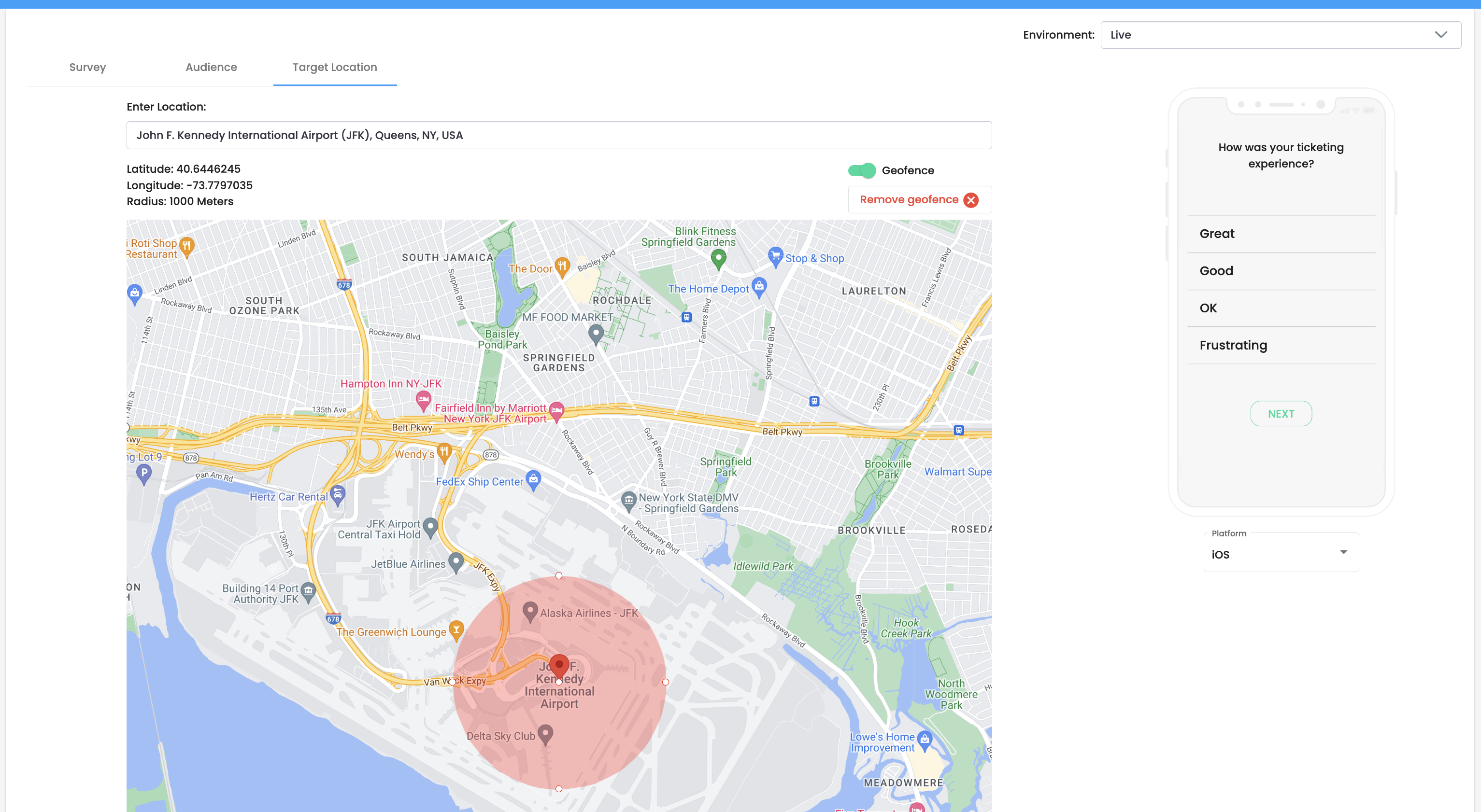
Target Location
Survey questions can be geofenced restricting travelers to a given location where the survey question can be answered.
QR Codes
To create a survey question that can be answered via scanning a QR Code, select QR Code for it's delivery on the Survey tab. This will give you the option to download a QR code that will present the survey question in a mobile browser when scanned by a traveler. All of the survey settings i.e geofencing will still apply.
Journeys
Journeys allow you to link several related questions to present all at once or over time. To create a Journey, select Journey for the category on the Survey tab. This will give you the option to add multiple linked questions.
Results
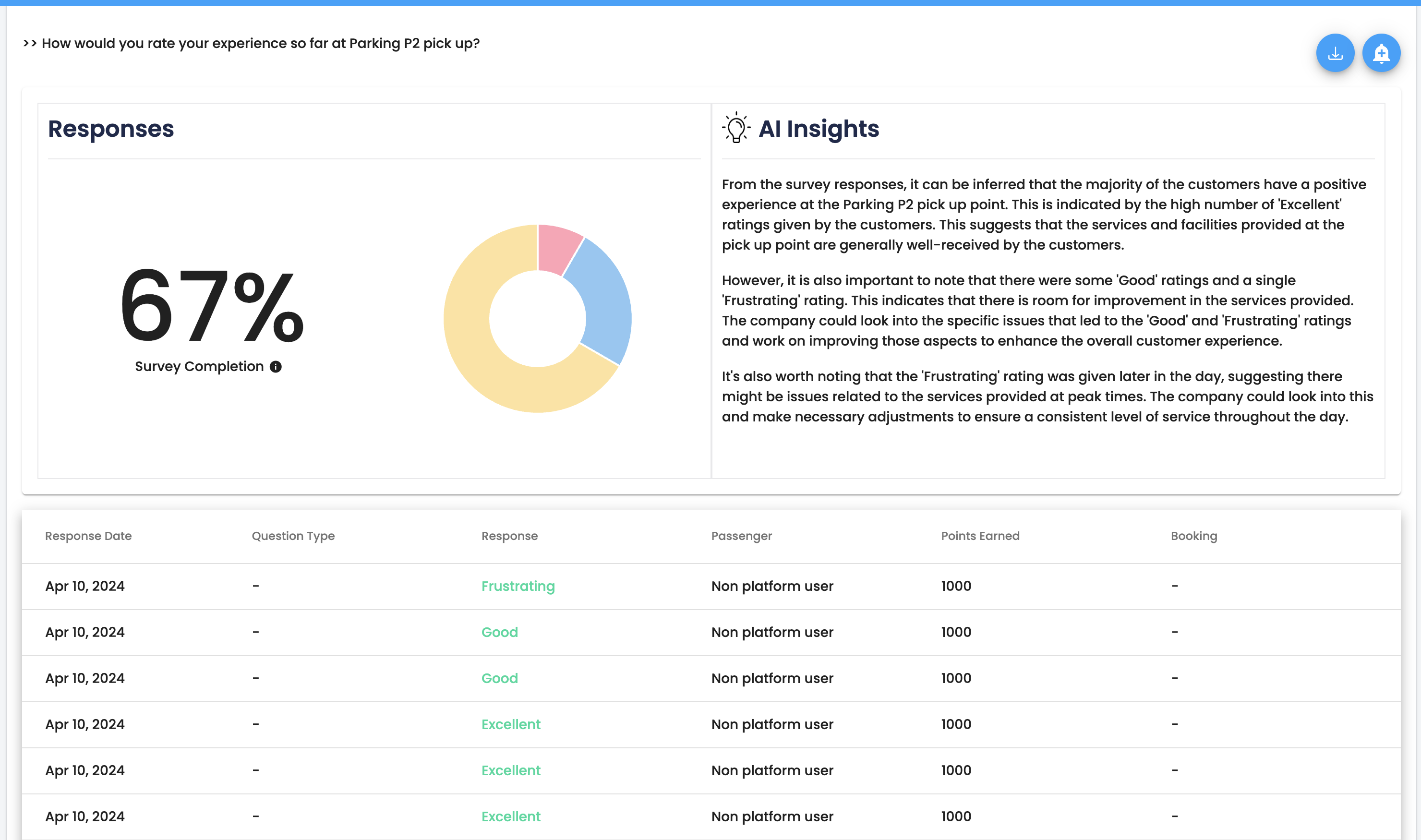
Each time surveys are completed, the dashboard will display all the responses with a real-time completion percentage and AI-powered insights on the collected data. Alerts can be set up to send emails when survey responses begin to trend negatively.
Rewards
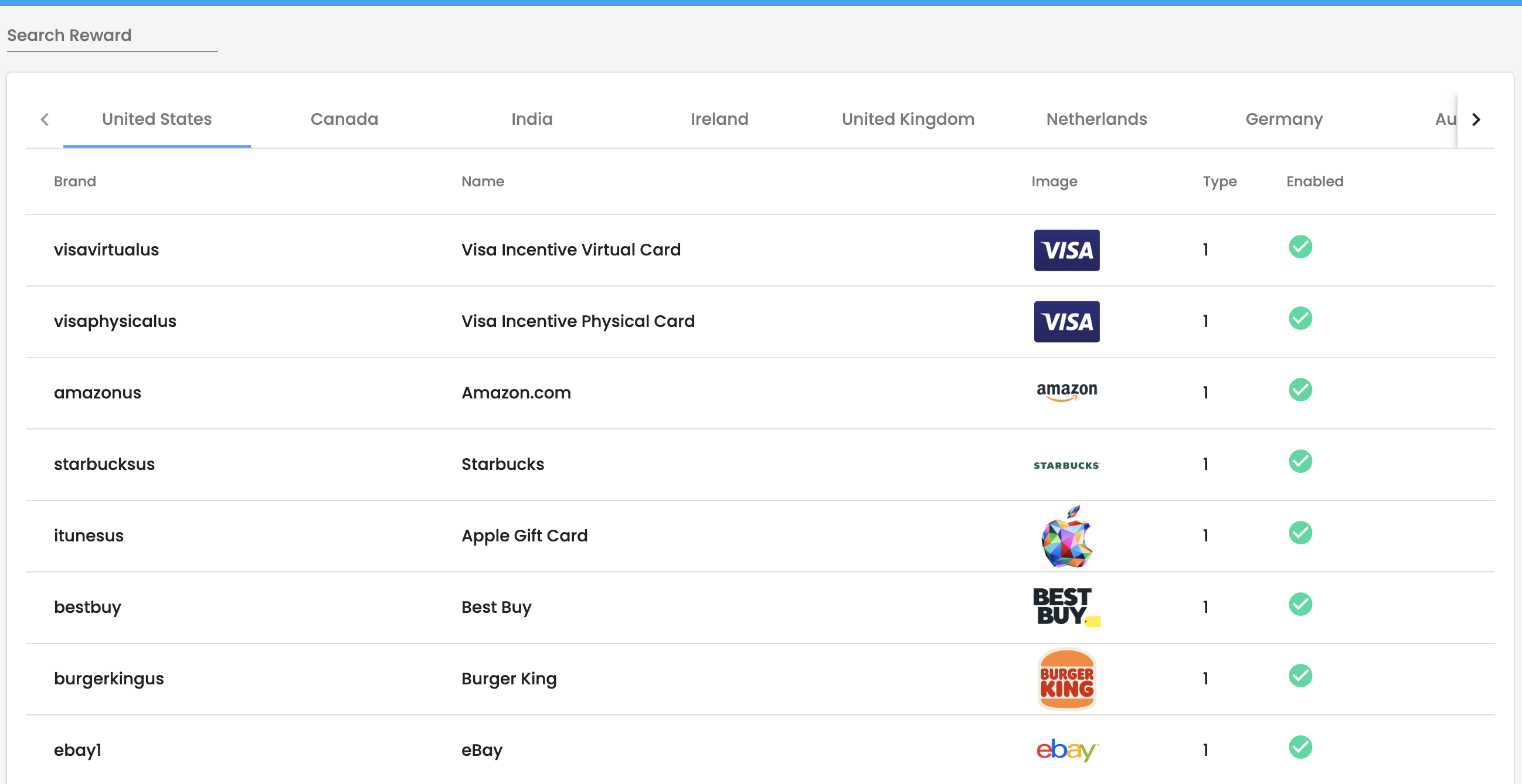
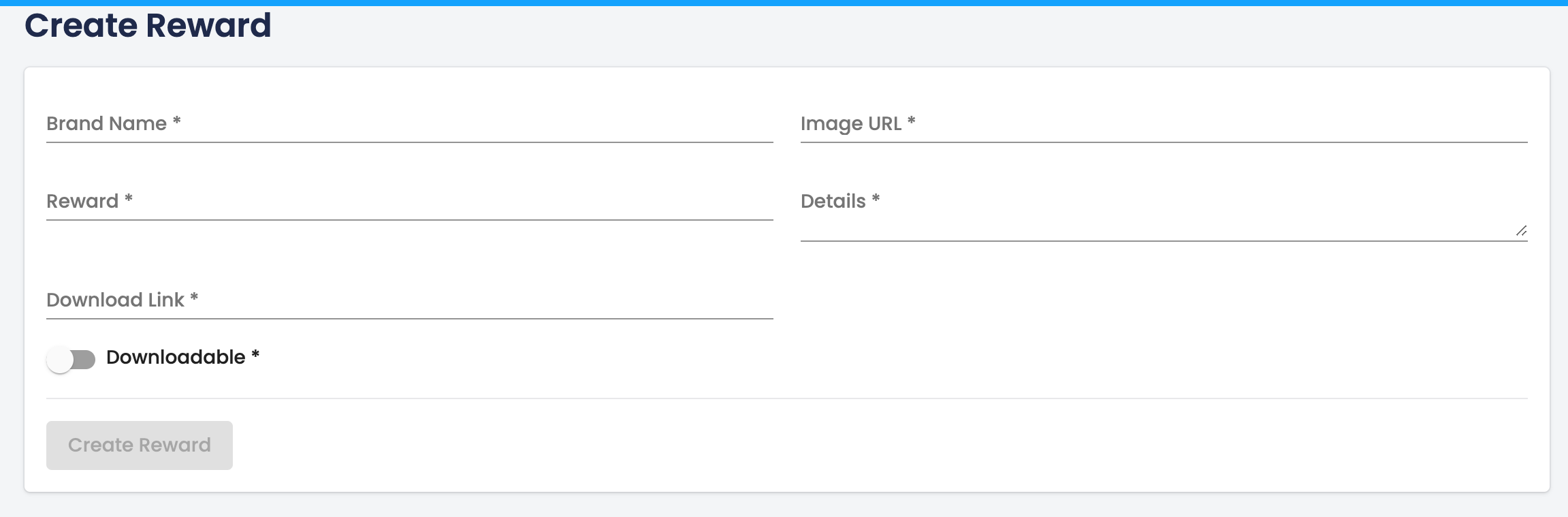
Meander has over 200+ rewards in it's catalog for your to reward users. Rewards are distributed via email and are geo-locked. You can also create your own custom reward in the Meander dasbhoard.
Errors
| Error Code | Meaning |
|---|---|
| 400 | Bad Request -- Your request is invalid. |
| 401 | Unauthorized -- Your API key is wrong. |
| 403 | Forbidden -- The survey requested is hidden for administrators only. |
| 404 | Not Found -- The specified survey could not be found. |
| 405 | Method Not Allowed -- You tried to access a survey with an invalid method. |
| 406 | Not Acceptable -- You requested a format that isn't json. |
| 410 | Gone -- The survey requested has been removed from our servers. |
| 429 | Too Many Requests -- You're requesting too many surveys! Slow down! |
| 500 | Internal Server Error -- We had a problem with our server. Try again later. |
| 503 | Service Unavailable -- We're temporarily offline for maintenance. Please try again later. |
License
Pulse Android SDK License Agreement
Effective Date: October 17, 2024
This License Agreement (“Agreement”) is a legal agreement between you (“Licensee”) and Meander Holdings Inc. (“Licensor”) for the use of the Pulse Android SDK (“Software”).
By downloading, installing, or using the Software, you agree to be bound by the terms of this Agreement. If you do not agree to these terms, do not download, install, or use the Software.
1. Grant of License
Licensor hereby grants Licensee a limited, non-exclusive, non-transferable, and revocable license to integrate and use the Software solely for the purpose of developing applications that interact with Licensor’s Pulse services.
2. Restrictions
Licensee may not:
Modify, reverse-engineer, decompile, disassemble, or attempt to derive the source code of the Software. Reproduce, distribute, or sublicense the Software to any third party. Use the Software for any purpose other than its intended use as described in the official documentation.
3. Ownership
The Software is licensed, not sold. Licensor retains all rights, title, and interest in and to the Software, including all intellectual property rights. Licensee acknowledges that no ownership rights are transferred by this Agreement.
4. API Key
Licensee must obtain a valid API key from Licensor to access the Software. Licensor reserves the right to revoke the API key at any time if Licensee violates any terms of this Agreement.
5. Termination
This Agreement is effective until terminated. Licensor may terminate this Agreement at any time if Licensee breaches any provision of this Agreement. Upon termination, Licensee must cease all use of the Software and destroy all copies of the Software in their possession.
6. No Warranty
THE SOFTWARE IS PROVIDED "AS IS," WITHOUT WARRANTY OF ANY KIND. LICENSOR DISCLAIMS ALL WARRANTIES, WHETHER EXPRESS, IMPLIED, OR STATUTORY, INCLUDING BUT NOT LIMITED TO THE WARRANTIES OF MERCHANTABILITY, FITNESS FOR A PARTICULAR PURPOSE, AND NON-INFRINGEMENT.
7. Limitation of Liability
TO THE MAXIMUM EXTENT PERMITTED BY LAW, IN NO EVENT SHALL LICENSOR BE LIABLE FOR ANY INDIRECT, INCIDENTAL, SPECIAL, CONSEQUENTIAL, OR PUNITIVE DAMAGES ARISING OUT OF OR RELATED TO THE USE OR INABILITY TO USE THE SOFTWARE.
8. Governing Law
This Agreement shall be governed by and construed in accordance with the laws of the state of [Insert State], without regard to its conflict of law provisions.
9. Entire Agreement
This Agreement constitutes the entire agreement between the parties and supersedes any prior agreements or understandings regarding the Software.